
Advanced Certificate in Fixing WordPress Errors: A Hands-On Guide
Master WordPress error resolution with this hands-on certificate, equipping you with practical skills to troubleshoot and fix issues efficiently.
Advanced Certificate in Fixing WordPress Errors: A Hands-On Guide
Programme Overview
The Advanced Certificate in Fixing WordPress Errors: A Hands-On Guide is designed for web developers, WordPress enthusiasts, and digital marketers who seek to enhance their troubleshooting and problem-solving skills in the WordPress environment. This comprehensive programme focuses on diagnosing and resolving a wide range of common and complex WordPress errors, including but not limited to theme and plugin conflicts, server configuration issues, and security vulnerabilities. Learners will also explore advanced techniques for performance optimization, site migration, and database management.
Throughout the course, participants will develop essential skills such as identifying and fixing syntax errors in PHP code, securing WordPress against various types of cyber threats, and optimizing the site’s performance using caching and lazy loading techniques. By the end of the programme, learners will be proficient in using tools like WP-CLI, debugging plugins, and a range of security plugins to maintain a robust and efficient WordPress site. They will also gain hands-on experience in handling live sites, applying best practices for error management, and ensuring compliance with web standards and security protocols.
The career impact of this programme is significant, as participants will be better equipped to handle the technical challenges of WordPress site management. Graduates can advance their roles within web development teams, take on more responsibility in client-facing projects, or start their own WordPress-focused consultancy. The skills gained are highly sought after in the digital marketplace, offering a clear path for professional growth and increased earning potential.
What You'll Learn
Embark on a transformative journey to master the art of resolving WordPress errors with our Advanced Certificate in Fixing WordPress Errors: A Hands-On Guide. Designed for web developers, content managers, and digital enthusiasts, this comprehensive program equips you with the skills to identify and fix a wide array of WordPress issues, from content management and theme customization to plugin conflicts and server configurations.
Key topics include debugging techniques, security enhancements, performance optimization, and troubleshooting strategies. You'll learn from experienced instructors who share best practices and real-world case studies, ensuring a deep understanding of WordPress architecture and its ecosystem.
By the end of this program, you'll be able to confidently diagnose and resolve complex errors, improving website functionality and user experience. Graduates apply these skills directly in their current roles or advance to more specialized positions such as WordPress support specialist, site reliability engineer, or senior web developer.
The program also offers networking opportunities through interactive workshops and a robust alumni network, connecting you with professionals in the field. Specialized job placement support and career advisement are provided, opening doors to lucrative career opportunities in the ever-evolving digital landscape. Join us and take the first step towards becoming a proficient WordPress error resolver.
Programme Highlights
Industry-Aligned Curriculum
Developed with industry leaders to ensure practical, job-ready skills valued by employers worldwide.
Globally Recognised Certificate
Recognised by employers across 180+ countries as a mark of professional excellence.
Flexible Online Learning
Study at your own pace with lifetime access to all course materials and updates.
Instant Access
Start learning immediately — no application process or waiting period required.
Constantly Updated Content
Stay ahead with the latest industry trends, best practices, and emerging insights.
Career Advancement
87% of graduates report measurable career progression within 6 months of completion.
Topics Covered
- 1. Introduction to WordPress: Learners will explore the basics of WordPress, including its architecture, key components, and development environment setup. They will gain foundational knowledge necessary to understand and navigate the WordPress ecosystem.
- 2. Debugging Tools and Error Logs: This module introduces learners to various debugging tools and error logging mechanisms available in WordPress. They will learn how to interpret error logs and use tools like Debug Bar to identify and resolve issues.
- 3. Understanding Themes and Child Themes: Here, learners will delve into the structure and functionality of WordPress themes, including how to create and modify child themes. Practical skills include theme customization and troubleshooting common theme-related errors.
- 4. Plugin Management and Troubleshooting: This module covers best practices for plugin selection, installation, and management. Learners will learn how to identify and resolve plugin conflicts and ensure plugins are up-to-date and secure.
- 5. Database Management and Query Debugging: Learners will study how to manage and optimize the WordPress database. They will learn to debug and improve performance by analyzing and optimizing SQL queries.
- 6. Common Server Configuration Issues: This module focuses on server configuration and how it impacts WordPress. Learners will learn to identify and resolve issues related to server settings such as PHP configurations, file permissions, and database settings.
- 7. Security Hardening and Best Practices: Here, learners will explore advanced security practices to protect their WordPress sites. Topics include securing plugins and themes, setting up HTTPS, and implementing security plugins.
- 8. Performance Optimization Techniques: This module covers strategies for optimizing WordPress performance. Learners will learn how to use caching, minification, and other techniques to speed up their sites.
- 9. Customizing WordPress Core Files: This advanced module teaches learners how to safely customize and extend core WordPress files. Topics include understanding core file structures and implementing custom functions and hooks.
- 10. Advanced Debugging Techniques: In this final module, learners will master advanced debugging techniques, including the use of custom error logging, advanced theme and plugin development, and integrating with development tools like Xdebug.
Everything You Get With This Programme
Key Facts
Audience: WordPress site administrators, beginners to intermediate users
Prerequisites: Basic WordPress knowledge, HTML/CSS understanding
Outcomes: Diagnose and fix common errors, enhance site performance
Ready to Advance Your Career?
Join thousands of professionals who have transformed their careers with LSBR.
Enroll Now — $149Why This Course
Enhance Your Troubleshooting Skills: This advanced certificate equips professionals with the knowledge to identify and resolve complex WordPress errors. By mastering techniques such as debugging, theme and plugin management, and security enhancements, participants can significantly improve their ability to maintain and optimize websites, directly impacting their career growth.
Boost Client Satisfaction: Understanding how to fix WordPress issues swiftly and effectively can lead to higher client satisfaction and more positive referrals. This certificate provides a comprehensive guide to handling various issues, from server errors to plugin conflicts, ensuring a smoother user experience and stronger client relationships.
Career Advancement: Acquiring this certificate signals to potential employers a deep commitment to professional development and expertise in WordPress management. It highlights advanced problem-solving abilities and technical acumen, making candidates more attractive for senior roles or specialized positions focused on WordPress development and maintenance.
Estimated Completion
3-4 Weeks
Path to Certification
1. Enroll
Sign up and get instant access to all course materials.
2. Learn
Study at your own pace with expert-designed content.
3. Complete
Finish the programme in as little as 3-4 weeks.
4. Get Certified
Receive your industry-recognised certificate from LSBR.
Join Our Global Alumni Network
0
Graduates +
0
Career Growth %
0
Salary Increase %
0
Countries +
Course Brochure
Download our comprehensive course brochure with all details
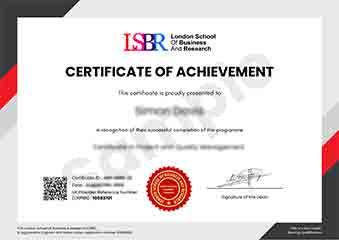
Sample Certificate
Preview the certificate you'll receive upon successful completion of this program.
Get Free Course Info
Enter your email and we'll send you the full course details, curriculum, and pricing information.
Is Your Employer Paying?
Many employers cover the cost of professional development. Request a corporate invoice and we'll handle everything — from enrolment to certification.
Trusted by 2,500+ Companies
From startups to Fortune 500 companies across 180+ countries.
What People Say About Us
Hear from our students about their experience with the Advanced Certificate in Fixing WordPress Errors: A Hands-On Guide at LSBR School of Professional Development.
Charlotte Williams
United Kingdom"This course provided an in-depth look at WordPress troubleshooting, equipping me with practical skills to resolve complex issues efficiently. The hands-on nature of the course has significantly boosted my confidence in managing WordPress sites, making it a valuable addition to my skill set."
Ashley Rodriguez
United States"This course has been incredibly valuable, equipping me with the advanced skills needed to troubleshoot and fix complex WordPress errors efficiently. It has not only enhanced my problem-solving abilities but also made me more competitive in the job market, opening up new opportunities for career advancement."
Hans Weber
Germany"The course is meticulously structured, making it easy to follow even for beginners, while the comprehensive content ensures a deep understanding of WordPress error resolution. It offers numerous real-world scenarios that significantly enhance practical skills and professional growth."
12 people are viewing this course right now