
Executive Development Programme in CSS Easing Fundamentals: Keyframes and Transitions
This programme equips executives with CSS easing fundamentals, mastering keyframes and transitions for enhanced web design and development skills.
Executive Development Programme in CSS Easing Fundamentals: Keyframes and Transitions
Programme Overview
The 'Executive Development Programme in CSS Easing Fundamentals: Keyframes and Transitions' is designed for mid-to-senior level web developers, UX/UI designers, and digital product managers seeking to enhance their skills in creating dynamic and visually appealing web interfaces. This program focuses on the latest advancements in CSS, particularly in easing functions, keyframes, and transitions, which are essential for crafting responsive and engaging user experiences.
Upon completion of this program, learners will develop a deep understanding of how to apply CSS keyframes to manipulate the timing and ease of transitions, enabling them to create smooth, fluid animations and effects. Key skills include mastering various easing functions, optimizing performance through efficient animation techniques, and integrating these animations into responsive web designs. Participants will also learn to use keyframe animations for complex transitions and to maintain accessibility standards while enhancing website interactivity.
This program significantly impacts career development by equipping professionals with advanced technical skills that are highly valued in the tech industry. Participants will be better positioned to lead projects requiring sophisticated animation techniques, enhance user engagement, and contribute to the design and development of cutting-edge web applications. The ability to demonstrate proficiency in these areas can lead to promotions, specialized roles in animation and design, and the capability to innovate within their organizations.
What You'll Learn
Embark on a transformative journey with our Executive Development Programme in CSS Easing Fundamentals: Keyframes and Transitions. This comprehensive program is designed for professionals who seek to enhance their web development skills, particularly in the realm of CSS animations. By mastering the art of keyframes and transitions, you will unlock advanced design capabilities that can significantly elevate the user experience on digital platforms.
The curriculum is meticulously crafted to cover essential topics such as the syntax and semantics of CSS keyframes, time functions for smooth animations, and the integration of transitions into web design. Through hands-on projects and real-world case studies, participants will apply these skills to create dynamic, responsive, and visually stunning web interfaces.
Upon completion, graduates will be well-prepared to lead projects that require sophisticated CSS animations, making them invaluable assets in roles such as senior web developers, front-end architects, and product managers. The program also provides networking opportunities with industry leaders and access to a robust alumni network, opening doors to new career opportunities and professional growth.
Invest in your future today and join our program to transform your web development expertise into a powerful tool for innovation and success.
Programme Highlights
Industry-Aligned Curriculum
Developed with industry leaders to ensure practical, job-ready skills valued by employers worldwide.
Globally Recognised Certificate
Recognised by employers across 180+ countries as a mark of professional excellence.
Flexible Online Learning
Study at your own pace with lifetime access to all course materials and updates.
Instant Access
Start learning immediately — no application process or waiting period required.
Constantly Updated Content
Stay ahead with the latest industry trends, best practices, and emerging insights.
Career Advancement
87% of graduates report measurable career progression within 6 months of completion.
Topics Covered
- 1. Introduction to CSS Easing and Keyframes: Learners will understand the basics of CSS easing functions and keyframes, learning how to create simple animations using keyframe declarations. Practical skills include writing basic keyframe animations and applying easing functions.
- 2. Mastering CSS Transitions: This module dives into CSS transitions, covering how to animate properties between states. Learners will gain skills in setting transition properties and creating smooth visual changes without using keyframes.
- 3. Advanced Keyframe Animations: Building on foundational knowledge, this module explores more complex keyframe animations, including timing curves and multiple keyframes. Practical skills include animating multiple properties and achieving precise control over animation sequences.
- 4. Timing and Delays in Animations: Learners will learn how to control the duration, timing function, and delay of animations. Skills gained include setting precise animation timings and delays to enhance user experience.
- 5. CSS Animations and JavaScript Integration: This module covers integrating CSS animations with JavaScript to create dynamic and interactive web experiences. Practical skills include triggering animations via JavaScript events and manipulating animation states programmatically.
- 6. Responsive Animations: Focusing on responsive web design, learners will learn how to make animations adapt to different screen sizes and device types. Skills include using viewport units and media queries to create adaptive animations.
- 7. Performance Optimization of Animations: This module teaches how to optimize CSS animations for better performance, reducing lag and improving load times. Practical skills include minimizing repaints and reflows, and using tools like Performance Timeline to identify bottlenecks.
- 8. Advanced Easing Functions and Curves: Delving into advanced easing techniques, learners will explore custom easing functions and the physics behind easing curves. Skills gained include creating custom easing functions and applying them to animations for unique effects.
- 9. Animating Complex UI Elements: This module applies all learned concepts to real-world UI components, such as navigation bars, dropdown menus, and buttons. Practical skills include animating complex UI elements to enhance user interaction and experience.
- 10. Final Project: A Comprehensive Animation Portfolio: In this capstone project, learners will apply all learned techniques to create a comprehensive portfolio of animations and transitions. Skills gained include project management, portfolio creation, and showcasing animation skills to potential employers or clients.
Everything You Get With This Programme
Key Facts
Audience: Web developers, designers
Prerequisites: Basic HTML, CSS knowledge
Outcomes: Master keyframes, transitions techniques
Ready to Advance Your Career?
Join thousands of professionals who have transformed their careers with LSBR.
Enroll Now — $199Why This Course
Enhanced Visual Communication Skills: This program equips professionals with the ability to create dynamic and engaging visual content through CSS animations. Understanding keyframes and transitions allows designers and developers to communicate complex ideas more effectively, making their work stand out in a competitive job market.
Improved User Experience Design: Learning CSS easing fundamentals is crucial for crafting smooth and intuitive user experiences. By mastering these techniques, professionals can ensure that transitions and animations are not only visually appealing but also enhance the usability of web applications and interfaces.
Competitive Advantage in the Job Market: As digital products become increasingly interactive, the ability to implement sophisticated animations and transitions is highly valued. This program provides professionals with the advanced skills needed to excel in roles that require proficiency in front-end web development, making them more attractive to potential employers and paving the way for career advancement.
Estimated Completion
3-4 Weeks
Path to Certification
1. Enroll
Sign up and get instant access to all course materials.
2. Learn
Study at your own pace with expert-designed content.
3. Complete
Finish the programme in as little as 3-4 weeks.
4. Get Certified
Receive your industry-recognised certificate from LSBR.
Join Our Global Alumni Network
0
Graduates +
0
Career Growth %
0
Salary Increase %
0
Countries +
Course Brochure
Download our comprehensive course brochure with all details
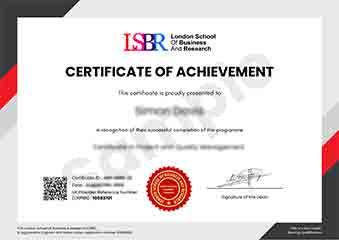
Sample Certificate
Preview the certificate you'll receive upon successful completion of this program.
Get Free Course Info
Enter your email and we'll send you the full course details, curriculum, and pricing information.
Is Your Employer Paying?
Many employers cover the cost of professional development. Request a corporate invoice and we'll handle everything — from enrolment to certification.
Trusted by 2,500+ Companies
From startups to Fortune 500 companies across 180+ countries.
What People Say About Us
Hear from our students about their experience with the Executive Development Programme in CSS Easing Fundamentals: Keyframes and Transitions at LSBR School of Professional Development.
Oliver Davies
United Kingdom"The course provided comprehensive and well-structured content on keyframes and transitions, which significantly enhanced my ability to create smooth and visually appealing animations. Gaining a solid understanding of these concepts has already proven invaluable in my recent project at work, where I was able to implement more dynamic user interfaces."
James Thompson
United Kingdom"This course has been incredibly valuable, equipping me with the skills to create more dynamic and responsive user interfaces, which are in high demand in the tech industry. It has not only enhanced my portfolio but also opened up new opportunities for career advancement in web development."
Isabella Dubois
Canada"The course structure is well-organized, providing a clear progression from basic keyframes to more complex transitions, which greatly enhances understanding and application in real-world scenarios. It offers a comprehensive overview that significantly contributes to professional growth in CSS easing fundamentals."
12 people are viewing this course right now