
Professional Certificate in Git and GitHub: Best Practices for Open Source Projects
Master Git and GitHub best practices for open source projects, enhancing collaboration and project management skills.
Professional Certificate in Git and GitHub: Best Practices for Open Source Projects
Programme Overview
This professional certificate program in Git and GitHub: Best Practices for Open Source Projects is designed for software developers, project managers, and tech enthusiasts who wish to enhance their skills in collaborative software development. It covers the essential aspects of using Git and GitHub, including version control practices, repository management, and the nuances of contributing to and managing open-source projects. Participants will learn how to effectively use Git commands, collaborate with team members, and leverage GitHub's features to streamline project workflows and improve code quality.
Key skills and knowledge developed through this program include proficiency in Git operations, understanding of Git workflows, and the ability to apply best practices in version control. Learners will gain hands-on experience in setting up and managing repositories, branching and merging strategies, and resolving conflicts. They will also learn how to contribute to open-source projects, including submitting pull requests, conducting code reviews, and engaging in community-driven development.
This program has a significant impact on career development, equipping participants with the skills necessary to work in agile development environments and contribute meaningfully to open-source communities. Graduates will be well-prepared to manage version control systems, collaborate with global teams, and enhance their professional profiles with a valuable set of skills that are in high demand in the tech industry.
What You'll Learn
The 'Professional Certificate in Git and GitHub: Best Practices for Open Source Projects' is a comprehensive, hands-on program designed for professionals and enthusiasts looking to master version control with Git and collaborative coding on GitHub. This program equips learners with the skills to manage and contribute effectively to open source projects, ensuring they can navigate complex codebases, resolve merge conflicts, and maintain project integrity.
Key topics include Git fundamentals, advanced Git workflows, GitHub features, and best practices for collaboration. Participants will learn how to automate workflows with GitHub Actions, manage repositories, and secure contributions through pull requests and code reviews.
By the end of the program, graduates will be well-prepared to lead or actively participate in open source communities, contributing to projects like Linux, TensorFlow, or React. This certificate is invaluable for software developers, project managers, and tech enthusiasts aiming to enhance their career prospects. Graduates can apply these skills to improve their current projects, seek leadership roles in open source initiatives, or transition into roles such as open source project manager or developer advocate.
Programme Highlights
Industry-Aligned Curriculum
Developed with industry leaders to ensure practical, job-ready skills valued by employers worldwide.
Globally Recognised Certificate
Recognised by employers across 180+ countries as a mark of professional excellence.
Flexible Online Learning
Study at your own pace with lifetime access to all course materials and updates.
Instant Access
Start learning immediately — no application process or waiting period required.
Constantly Updated Content
Stay ahead with the latest industry trends, best practices, and emerging insights.
Career Advancement
87% of graduates report measurable career progression within 6 months of completion.
Topics Covered
- 1. Introduction to Git and Version Control: Learners will study the basics of version control and how Git works, including committing changes, branching, and merging. They will gain practical skills in using Git for local repositories.
- 2. Git Commands and Workflow: This module covers essential Git commands and workflow practices, enabling learners to efficiently manage their code repositories and collaborate with others.
- 3. GitHub Basics: Learners will explore GitHub's features and how to use it to host and manage Git repositories, including creating repositories, managing branches, and setting up a remote repository.
- 4. Advanced Git Techniques: This module delves into advanced Git techniques such as rebasing, interactive rebasing, and force pushing, which are crucial for maintaining a clean commit history.
- 5. Collaborative Workflow with GitHub: Learners will learn best practices for collaborating on projects using GitHub, including pull requests, code reviews, and managing issues and milestones.
- 6. Security and Best Practices: This module covers security best practices for open source projects, including managing secrets, setting up SSH keys, and protecting repositories from unauthorized access.
- 7. Automating Tasks with Git Hooks: Learners will learn how to write and use Git hooks to automate common tasks, ensuring that code quality is maintained and project consistency is enforced.
- 8. Continuous Integration with GitHub Actions: This module introduces learners to GitHub Actions and how to set up continuous integration pipelines to automate testing and deployments.
- 9. Documentation and Communication: Learners will learn how to maintain project documentation and communicate effectively with the open source community, including writing READMEs, contributing guidelines, and using community tools.
- 10. Project Management and Release Strategy: This module covers project management strategies and release planning in the context of open source projects, including versioning, release notes, and managing project timelines.
Everything You Get With This Programme
Key Facts
Audience: Developers, open source contributors
Prerequisites: Basic programming knowledge
Outcomes: Master Git/GitHub, collaborate effectively
Ready to Advance Your Career?
Join thousands of professionals who have transformed their careers with LSBR.
Enroll Now — $149Why This Course
Enhanced Skill Set: Acquiring a Professional Certificate in Git and GitHub equips professionals with advanced skills in version control and collaborative software development. These skills are crucial for managing projects efficiently and working effectively in team environments, which can significantly enhance career prospects.
Practical Application: The course focuses on best practices for open source projects, providing hands-on experience with Git and GitHub. This practical knowledge is directly applicable to real-world scenarios, enabling professionals to contribute meaningfully to open source communities and improve their own projects.
Career Advancement: By mastering Git and GitHub, professionals can showcase their expertise to potential employers, making them more attractive candidates for roles that require strong coding and collaboration skills. This certification can open doors to leadership positions in development teams and projects that leverage these tools extensively.
Community Engagement: The certificate enhances understanding of open source project management, fostering a deeper connection with the broader developer community. This engagement can lead to networking opportunities, mentorship, and collaborations that can further boost career growth.
Estimated Completion
3-4 Weeks
Path to Certification
1. Enroll
Sign up and get instant access to all course materials.
2. Learn
Study at your own pace with expert-designed content.
3. Complete
Finish the programme in as little as 3-4 weeks.
4. Get Certified
Receive your industry-recognised certificate from LSBR.
Join Our Global Alumni Network
0
Graduates +
0
Career Growth %
0
Salary Increase %
0
Countries +
Course Brochure
Download our comprehensive course brochure with all details
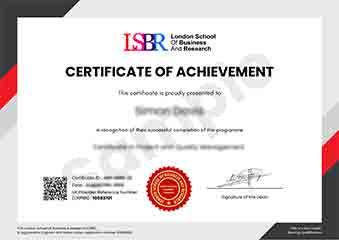
Sample Certificate
Preview the certificate you'll receive upon successful completion of this program.
Get Free Course Info
Enter your email and we'll send you the full course details, curriculum, and pricing information.
Is Your Employer Paying?
Many employers cover the cost of professional development. Request a corporate invoice and we'll handle everything — from enrolment to certification.
Trusted by 2,500+ Companies
From startups to Fortune 500 companies across 180+ countries.
What People Say About Us
Hear from our students about their experience with the Professional Certificate in Git and GitHub: Best Practices for Open Source Projects at LSBR School of Professional Development.
Sophie Brown
United Kingdom"The course content is incredibly comprehensive, covering all the essential aspects of Git and GitHub that are crucial for managing open source projects. I gained practical skills that have already improved my ability to contribute effectively to open source communities, making me more confident in my coding and collaboration abilities."
Ashley Rodriguez
United States"This course has been instrumental in enhancing my understanding of Git and GitHub best practices, making me more competitive in the tech job market. I've learned how to collaborate effectively on open source projects, which has opened up new opportunities for me in my career."
Liam O'Connor
Australia"The course structure is well-organized, providing a clear path from basic Git commands to advanced GitHub features, which significantly enhances my understanding and application of version control in real-world projects. It has been instrumental in my professional growth, equipping me with best practices for collaborating on open-source projects."
12 people are viewing this course right now